Sequences
Sequences that email and call the same lead, on the schedule you set.
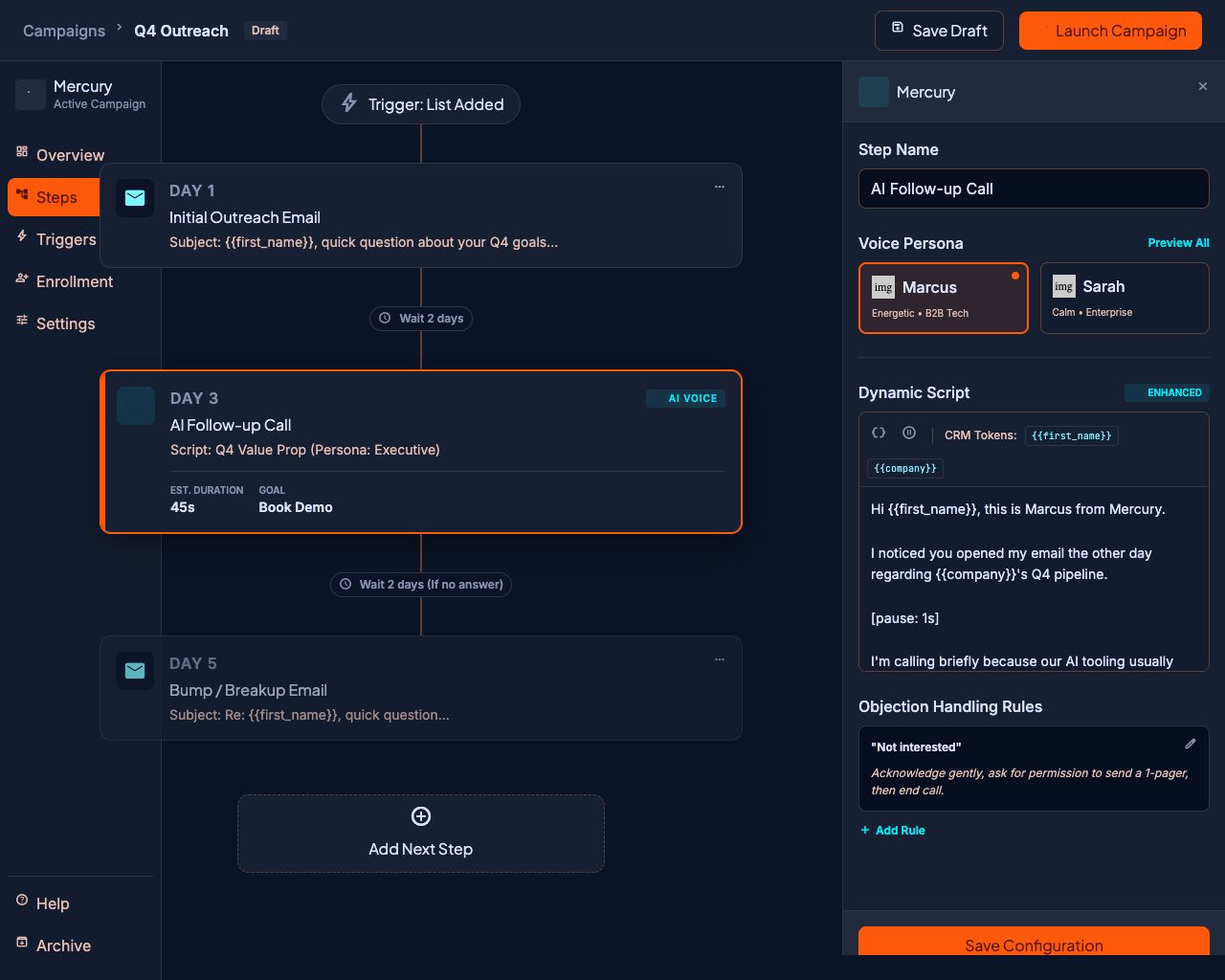
One builder for every touch. Step one is an email, step three is a phone call, step five is an AI voice call — same contact, same timeline, same rules. No exports, no second tool, no guessing what happened last Tuesday.
Most outbound teams run two systems that don't talk to each other. The email platform doesn't know a call was made. The dialer doesn't know the email went unanswered. Reps reconcile the difference by hand, badly, and prospects get contacted twice in a morning.
Mercury runs both channels as steps in one sequence against one contact record. The follow-up call knows the email was ignored. The sequence stops the moment someone replies — on either channel.
What it does
Absolute scheduling, not "three days later, probably"
Every step carries a real date and time. Step three sends Tuesday at 9:15, not "72 hours after step two fired, whenever that happened to be." Sequences drift when steps are relative; yours will not.
- Chronological validation — Mercury refuses to save a sequence where step four lands before step three
- Steps renumber themselves when you insert or delete one
- Activating a campaign schedules every enrolled lead immediately
Personalization from any column you upload
Import a spreadsheet and every column becomes a variable. First name and company are there by default; so is anything else you brought — job title, renewal date, the competitor they are using.
- Case-insensitive and forgiving: firstName, first_name, and name all resolve
- Missing values leave clean gaps instead of printing a raw token at a prospect
- The same variables work in email bodies and AI call scripts
Rich email, real threading
Compose with formatting, links, images, tables, and attachments. Follow-ups thread under the original message with a proper Re: subject and RFC reply headers, so the conversation reads like a conversation instead of five orphaned emails.
Voice steps in the same sequence
Early accessChange a step's type from email to AI voice call and the rest of the sequence does not change. The call inherits the same lead, the same variables, and the same guardrails.
Automatic stop on reply
Someone answers, and the sequence stops for that lead — instantly, across every campaign they are in. This includes replies that arrive in Outlook, and emails your rep sends manually from their own mailbox. Nobody gets step four after they have already said yes.
How it works
- 01
Create the campaign
Name it and pick who owns it.
- 02
Build the steps
Write the emails, set each send time, and add call steps where you want a human voice.
- 03
Import your leads
CSV or Excel. Mercury maps the columns and catches duplicates before anything is created.
- 04
Activate
Steps fire on schedule, replies stop sequences, and the CRM stays current without anyone updating it.
What this replaces
A cold email platform, a separate dialer, and the spreadsheet your team uses to remember which one already touched a lead.
Questions people ask
What is the difference between a sequence and a campaign?
A campaign is the container — a name, a status, and a list of enrolled leads. A sequence is the ordered set of steps inside it. One campaign, one sequence, many leads moving through it at their own pace.
Can one lead be in two campaigns at once?
By default, no — Mercury blocks it, so nobody receives two pitches in the same week. You can turn that protection off per workspace, or queue the lead to enroll automatically when their current sequence finishes.
What happens when a lead replies mid-sequence?
Their sequence freezes immediately and the thread appears in your unified inbox. Nothing further sends unless you restart them deliberately.
Can I add attachments to a step?
Yes — any step can carry files, and they are sent as real attachments through your mailbox rather than as links.
Can I edit a sequence that is already running?
Yes. Pause the campaign, change the steps, and reactivate. Leads resume from the step they had reached.
Explore the rest of the platform
AI voice agent
Early accessAI voice agents that call your leads in your rep's cloned voice, handle objections, detect voicemail, and transfer live when a prospect is ready.
Read more →CRM
Leads, owners, custom fields, and full activity history attached to the campaigns, emails, and calls that created them.
Read more →Deliverability
Per-mailbox caps, warm-up ramps, suppression lists, unsubscribe headers, and domain health checks — built in, not bolted on.
Read more →Give your reps their week back.
Connect a mailbox, import a list, and launch your first sequence.